Build better learning experiences with AI grounded in learning science.
Learning design is complex. Lira Studio simplifies it.
Before materials are created, teams need to know what learners are working toward and what will help them get there.
Lira Studio gives teams a structured process for designing learning before materials.
- Structure the project, learner context, and design library with source materials, instructional moves, and alignment requirements.
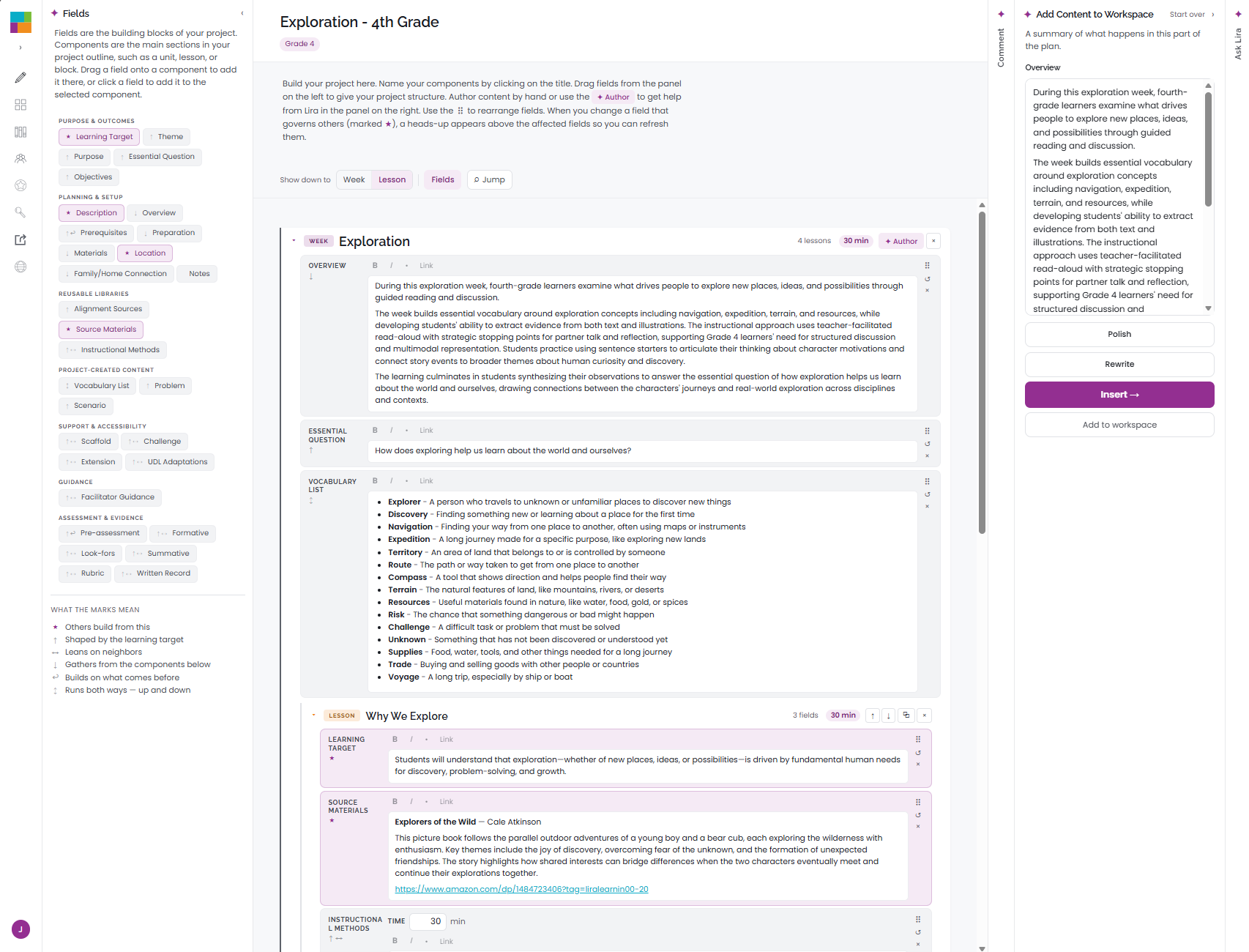
- Drag and drop instructional components such as objectives, content references, activities, scaffolds, assessments to the workspace.
- Use AI helpers to define and refine each component with greater speed, clarity, and consistency across the project.
- Export project plans into blueprints, manuscripts, course outlines, lesson plans, raw data, and other production-ready formats.
Curriculum design is stronger when teams have a shared space to align the work.
Lira Studio helps teams collaborate around instructional decisions, keeping project structure, feedback, permissions, and review workflows connected in one workspace.
- Create shared team workspaces for design projects.
- Invite authors, reviewers, and collaborators with appropriate permission levels.
- Comment directly on instructional components so feedback stays connected to the work.
- Review goals, learner context, activities, scaffolds, and assessments in one place.
- Track decisions and revisions without relying on scattered files or message threads.
- Move the project from design to review to export with a clearer shared workflow.
Instructional design should be grounded in learning science.
Lira Studio helps teams apply learning science through built-in research on learner readiness, instructional moves, and effective learning design.
- Ground the design in learner context through research-informed readiness profiles.
- Match instructional moves to learner readiness, context, and what the learning requires.
- Align objectives, activities, and supports with how learning happens within your selected context.
- Apply learning science consistently across the design process to ensure pedagogical rigor.
AI should amplify, not replace, human creativity.
Lira Studio keeps humans in the lead while using AI to assist the design process. Teams make the instructional decisions, define the context, shape the curriculum, and review the outputs.
- Use built-in prompt architecture that sets boundaries before generation begins.
- Provide AI with resolved instructional context instead of vague, disconnected prompts.
- Use AI helpers to draft and refine components within the decisions the team has already made.
- Review and approve AI-generated content before it becomes part of the design.
The Lira Studio Workspace
This is where your curriculum, course, or instructional design project takes shape. After setting up your project structure, context, libraries, and team, drag fields from the panel on the left to add design elements. Author content yourself or use the AI helper on the right, then export your finished project into production-ready formats. The current view shows the K–12 environment, but field options change based on your learner population, from PK through adult learning formats.